How to search past Claude Code, Codex and Cursor sessions and hand them off
You remember the work but not which agent you did it in. We compare history search tools such as ah, ctx and Afterpaths, then show how ContextBerg goes from search to a handoff the next agent can pick up.
Read in Japanese →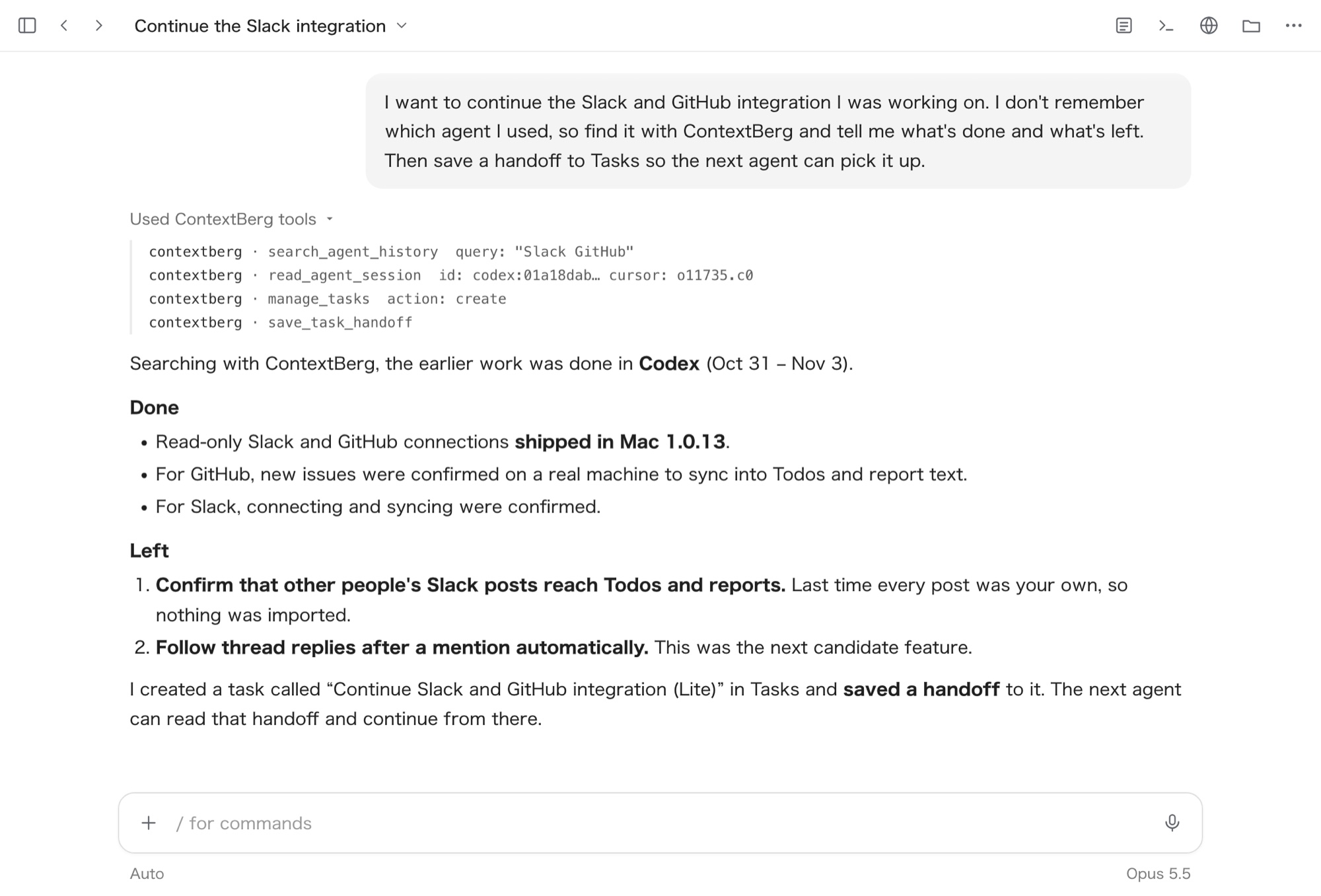
You remember the topic, not which agent you used
"Let's pick up the Slack integration from last week." When you come back to work, you remember what it was about, but often not when it happened or whether it was Claude Code, Codex or Cursor. The research may have happened in ChatGPT or Perplexity.
You need two things: a way to find past conversations without a date, and a way to leave what you found in a form the next agent can continue from.
Comparing history search tools
There are already several tools, mostly open source, for searching coding-agent history. Here are the main ones next to Claude Code's built-in commands and ContextBerg.
| Option | Covers | Search | MCP | Handoff | Browser AI chats |
|---|---|---|---|---|---|
| Claude Code built-in | Claude Code only (per project) | Filter in the resume picker | — | Name a session and resume it | — |
| ah | 10 agents incl. Claude Code, Codex, Cursor | Regex full-text | Yes | No (resume command only) | Not supported |
| ctx | 46 agents | BM25 (optional semantic) | Yes (read-only) | No (export and team sharing) | Not supported |
| Afterpaths | Claude Code, Codex, Cursor (partial) | Keyword | Yes | Summaries and rule files | Not supported |
| ContextBerg | Claude Code, Codex, Cursor | Keyword, no date needed | Yes | Per-task handoffs | Yes (Chrome extension) |
For search alone, the open-source tools are strong. ah and ctx both work from agents over MCP and support more agents than ContextBerg. If you want to search yourself in a terminal, start there.
The difference shows up after the search. ah and ctx find and show existing conversations; neither saves the state of a piece of work. Afterpaths saves summaries and rules, but as project conventions, not as the state of unfinished work. session-migrate converts a conversation into another agent's format, but currently targets Linux.
The other difference is how long the record lasts. Claude Code deletes sessions older than 30 days by default. ah reads the original files in place, and ctx drops records from its index once their source deletion is confirmed. With either, work from more than a month ago can disappear.
And none of these tools lists browser AI chats among its sources, so the research that came before the implementation stays out of reach.
ContextBerg goes from search to handoff in one flow
With ContextBerg, you ask the agent you already have open: "continue the thing I was doing with X." Over MCP, the agent works through these steps.
| Step | What the agent does |
|---|---|
| Find | Searches Claude Code, Codex and Cursor sessions together by keyword, no date needed |
| Read | Reads the matching session page by page to see what is done and what is left |
| Save | Saves a handoff to Tasks: the goal, current state, completed steps, next steps, blockers, decisions, where to resume, and excerpts from the conversations as evidence |
| Continue | The next agent reads the saved handoff and starts from there |
Handoffs are stored in the ContextBerg app, so they remain even after the original agent deletes its old history. Because evidence excerpts are saved with them, the next agent can also trace why something was done.
Bring your research chats in with the browser extension
The Chrome extension Contextberg Browser AI History saves conversations from ChatGPT, Claude, Gemini, Perplexity and Manus locally, and makes them searchable and taggable.
Agents can read those saved chats by date through ContextBerg. For work like "researched the Slack API in ChatGPT, then implemented it in Codex", the research and the implementation status go into the same handoff. Everything stays on your machine.
How to use it
Update ContextBerg to 1.0.16 or later and connect your agent from Export > MCP. To include browser AI chats, install the Chrome extension too. Restart the agent, then ask:
"I want to continue the Slack integration I was working on. How far did it get?"
At a good stopping point, ask it to "save what we have so far as a handoff." To resume in another agent, ask it to "read the Slack integration handoff and continue," and it starts from where you saved.
On the Free plan, reading history counts toward the monthly MCP limit, and each page of a long session counts once.